How to Read an Inch Ruler: 1/2, 1/4, 1/8 and 1/16 Marks
What every line on an inch ruler means: count sixteenths, simplify fractions like 6/16 = 3/8, and convert any mark to decimal inches and millimeters.
·
The tick hierarchy
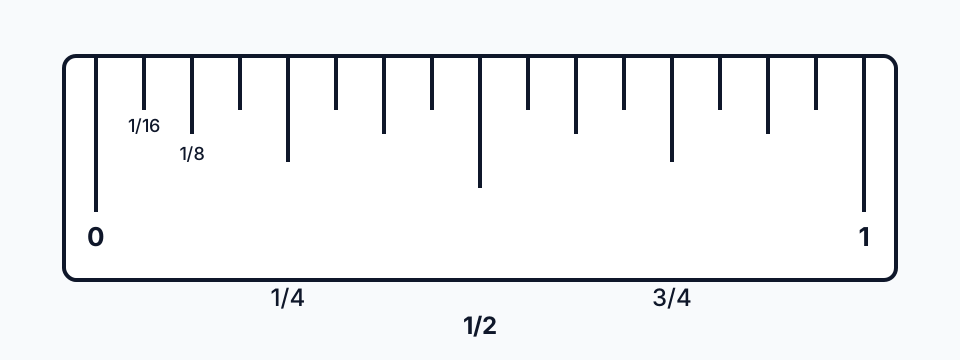
Tick length identifies the fraction. This teaching diagram is not actual size.
An inch ruler divides each inch by repeated halving. The marks between two whole-inch numbers are not evenly important; their length tells you which fraction they represent.
| Tick length | Fraction | Ticks per inch |
|---|---|---|
| Longest, numbered | 1 in | 1 |
| Long | 1/2 in | 1 |
| Medium | 1/4 in | 2 |
| Short | 1/8 in | 4 |
| Shortest | 1/16 in | 8 |
Counting all of them, an inch on a sixteenth ruler has 16 spaces and 15 marks between the whole-inch lines. Some machinist rulers add a still shorter row of 1/32-inch marks, and the same logic extends to them. The inch ruler on this site draws these tick lengths, so you can compare it with a physical ruler side by side.
Counting in sixteenths
The simplest way to read any position is to count every mark, no matter its length, as one sixteenth. Start at the last whole-inch line to the left of your point and count the marks up to it.
- 1 mark past the inch line is 1/16 in.
- 4 marks is 4/16 in, which is the medium 1/4-inch tick.
- 8 marks is 8/16 in, the long 1/2-inch tick.
- 12 marks is 12/16 in, the 3/4-inch tick.
If your ruler only has eighth marks, count each as 2/16 (or simply count in eighths). If it has thirty-seconds, count each as 1/32 and halve the count to get sixteenths.
Reducing fractions
A count in sixteenths is correct but not conventional. Reduce it by dividing numerator and denominator by 2 until the numerator is odd:
- 12/16 → 6/8 → 3/4
- 10/16 → 5/8
- 8/16 → 4/8 → 2/4 → 1/2
- 6/16 → 3/8
- 5/16 stays 5/16
An odd numerator over 16 is already in lowest terms. Carpenters usually say the reduced form, so "two and twelve sixteenths" is spoken as "two and three quarters."
Fraction, decimal, and millimeter table
One inch is exactly 25.4 mm, so one sixteenth is 25.4 / 16 = 1.5875 mm. Every entry below follows from multiplying that value.
| Sixteenths | Reduced | Decimal inches | Millimeters |
|---|---|---|---|
| 1/16 | 1/16 | 0.0625 | 1.5875 |
| 2/16 | 1/8 | 0.125 | 3.175 |
| 3/16 | 3/16 | 0.1875 | 4.7625 |
| 4/16 | 1/4 | 0.25 | 6.35 |
| 5/16 | 5/16 | 0.3125 | 7.9375 |
| 6/16 | 3/8 | 0.375 | 9.525 |
| 7/16 | 7/16 | 0.4375 | 11.1125 |
| 8/16 | 1/2 | 0.5 | 12.7 |
| 9/16 | 9/16 | 0.5625 | 14.2875 |
| 10/16 | 5/8 | 0.625 | 15.875 |
| 11/16 | 11/16 | 0.6875 | 17.4625 |
| 12/16 | 3/4 | 0.75 | 19.05 |
| 13/16 | 13/16 | 0.8125 | 20.6375 |
| 14/16 | 7/8 | 0.875 | 22.225 |
| 15/16 | 15/16 | 0.9375 | 23.8125 |
| 16/16 | 1 | 1.0 | 25.4 |
For values that are not on the table, such as 2 5/16 in, convert the whole number and the fraction separately and add them, or paste the decimal into the unit converter. A quick sanity check for any conversion: a millimeter is a little more than half a sixteenth, so a length in millimeters should be roughly 1.6 times the count of sixteenths.
Feet-and-inches notation
Lengths over 12 inches are written as feet and inches, with a prime for feet and a double prime for inches: 5′ 3 1/2″ means 5 feet plus 3 1/2 inches. To turn that into a single unit:
- Multiply feet by 12: 5 × 12 = 60 in.
- Add the inches and fraction: 60 + 3.5 = 63.5 in.
- Multiply by 25.4 for millimeters: 63.5 × 25.4 = 1612.9 mm, or 161.29 cm.
Tape measures often mark feet with a different color or a small flag every 12 inches while continuing to count inches past 12, so 63 1/2 in and 5′ 3 1/2″ appear on the same tape at the same spot.
Worked examples
Example 1. The edge of a board falls 11 small marks past the 2-inch line. Reading: 2 11/16 in. The numerator is odd, so it does not reduce. In decimal, 2 + 0.6875 = 2.6875 in; in millimeters, 2.6875 × 25.4 = 68.2625 mm.
Example 2. A bolt lines up exactly with the medium tick between 1/2 and 1. The medium ticks are quarters, so this is 3/4 in = 0.75 in = 19.05 mm.
Example 3. Adding two readings, 3/8 in and 5/16 in. Convert to a common denominator: 6/16 + 5/16 = 11/16 in. In millimeters, 9.525 + 7.9375 = 17.4625 mm, which matches the table.
Example 4. A photo frame opening measures 7 1/8 in. Halve it to find the center: 7.125 / 2 = 3.5625 in = 3 9/16 in.
When a reading falls between two marks, name the nearer mark and add a plus or minus, such as "5/8 plus." Sixteenth marks are about 1.6 mm apart, so a reading finer than that is a guess unless the ruler has thirty-seconds.
Checking your reading against a metric ruler
If you have both systems available, reading the same object on the millimeter ruler is the fastest way to confirm a fractional reading. The object in Example 1 should show 68 mm and a little more. If the metric reading and the converted fraction disagree by more than one sixteenth, recount the marks from the previous whole inch. On an actual-size screen ruler, also confirm that the browser is at 100 percent zoom and that the display has been calibrated; see how we calculate accuracy for why that matters.
More guides
Credit Card Size: 3.37 × 2.125 in (85.6 × 53.98 mm)
A standard credit card is 85.60 × 53.98 mm (3.370 × 2.125 in) under ISO/IEC 7810 ID-1. Also: thickness, corner radius, and how to check a ruler with it.
Read guideA4 Size in Pixels: 2480 × 3508 at 300 DPI (+72, 96, 150)
A4 is 210 × 297 mm: 2480 × 3508 px at 300 DPI, 794 × 1123 at 96 DPI and 595 × 842 at 72 DPI. Plus the formula, A3/A5 sizes and US Letter.
Read guideHow to Calculate Screen PPI: Formula and Worked Examples
PPI = diagonal pixels ÷ diagonal inches. Worked examples (a 24-inch 1080p monitor is 91.8 PPI) and why a browser ruler still needs calibration.
Read guide