Centimeter Ruler (cm)
A centimeter-first ruler with the metric scale on top. Calibrate, verify with a physical reference, then read cm and mm values from your screen.
Display settings
Calibration details
Resulting density: 96.0 PPI · Not calibrated · estimate only
Verify against a physical reference. Different displays can report identical parameters; display changes cannot always be detected.
Press and drag across the ruler to measure a distance in cm and inches.
Keyboard: focus the ruler and press Enter to start at zero, then Tab to − or + to adjust.
Measuring in centimeters
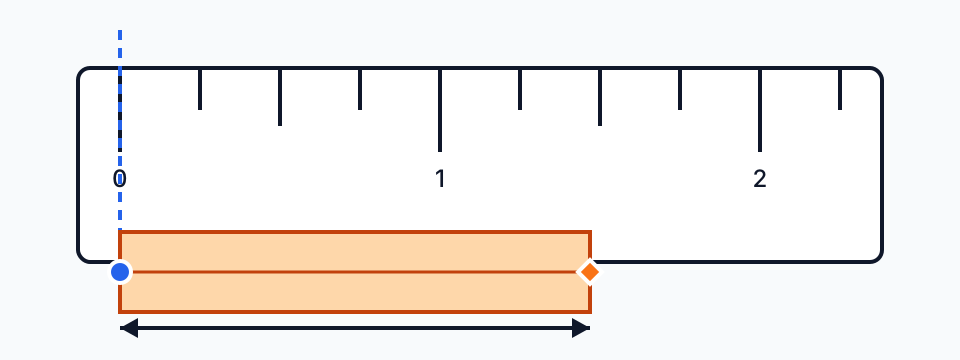
Reading cm and mm
The centimeter scale follows the metric convention: a long mark every centimeter, a medium mark at each half centimeter, short marks for millimeters. Reading is additive — the last centimeter mark passed plus the millimeter marks beyond it. Because 1 cm is exactly 10 mm, you can switch to the millimeter ruler at any time without changing the geometry.
Common centimeter references
Objects with standardized sizes make good calibration checks. Lay one against the ruler; if the reading matches the table, the calibration is sound.
| Object | Size |
|---|---|
| Bank card (ISO/IEC 7810 ID-1) | 8.56 × 5.40 cm |
| A4 sheet (ISO 216) | 21.0 × 29.7 cm |
| US Letter sheet | 21.6 × 27.9 cm |
| AA battery (IEC LR6) | 5.05 × 1.45 cm |
| CD or DVD | 12.0 cm diameter |
What centimeters are good for
Metric is the default for sewing patterns, paper and envelope sizes, furniture, packaging and most product listings outside the US. Craft and DIY dimensions between 1 and 30 cm are where a screen ruler is most practical: the object lies flat against the glass and the reading is immediate.
Converting to inches
Multiply centimeters by 0.3937 to get inches, or divide by 2.54. For woodworking and US hardware you usually want a fraction: 10 cm is 3 15/16 in. The unit converter shows the nearest 1/16 fraction, and the inch ruler guide explains how to read those marks.
Centimeter reference tables
Sizes people most often check in centimeters, with inch equivalents. Values come from the relevant ISO, JIS and ANSI standards or official photo rules, and inch columns are computed from 1 in = 2.54 cm.
How many centimeters fit on your screen
A screen ruler can only measure what fits on the display. These are the panel dimensions for common nominal diagonals and aspect ratios; the browser window is a little smaller once the address bar, taskbar or dock is subtracted. Use full-screen mode for the longest ruler.
| Screen | Long side | Short side |
|---|---|---|
| 6.1-inch phone (19.5:9) | 14.1 cm (5.5 in) | 6.5 cm (2.6 in) |
| 11-inch tablet (about 1.43:1) | 22.9 cm (9.0 in) | 16.0 cm (6.3 in) |
| 13.3-inch laptop (16:10) | 28.6 cm (11.3 in) | 17.9 cm (7.0 in) |
| 14-inch laptop (16:10) | 30.2 cm (11.9 in) | 18.8 cm (7.4 in) |
| 15.6-inch laptop (16:9) | 34.5 cm (13.6 in) | 19.4 cm (7.6 in) |
| 24-inch monitor (16:9) | 53.1 cm (20.9 in) | 29.9 cm (11.8 in) |
| 27-inch monitor (16:9) | 59.8 cm (23.5 in) | 33.6 cm (13.2 in) |
For anything longer than the long side, measure in sections or photograph the object next to a known reference and use the image measurement tool.
Paper sizes in centimeters
ISO A sizes halve at each step — an A4 sheet is exactly half an A3 — and every A size has the same 1:√2 proportions. JIS B5, common for notebooks in Japan and Taiwan, is slightly larger than ISO B5. North America uses Letter, Legal and Tabloid instead.
| Paper size | Centimeters | Inches |
|---|---|---|
| A3 | 29.7 × 42.0 cm | 11.69 × 16.54 in |
| A4 | 21.0 × 29.7 cm | 8.27 × 11.69 in |
| A5 | 14.8 × 21.0 cm | 5.83 × 8.27 in |
| A6 | 10.5 × 14.8 cm | 4.13 × 5.83 in |
| B5 (ISO) | 17.6 × 25.0 cm | 6.93 × 9.84 in |
| B5 (JIS) | 18.2 × 25.7 cm | 7.17 × 10.12 in |
| US Letter | 21.6 × 27.9 cm | 8.50 × 11.00 in |
| US Legal | 21.6 × 35.6 cm | 8.50 × 14.00 in |
| Tabloid / Ledger | 27.9 × 43.2 cm | 11.00 × 17.00 in |
Need the same sizes in pixels for a print file? See A4 paper size in pixels.
Passport photo sizes
A passport photo is small enough to check on any laptop screen. Place the print on the ruler and confirm both edges before you submit it. Each authority also sets rules for head size, background and age of the photo, which a ruler cannot check.
| Country or area | Width × height (cm) | Width × height (in) |
|---|---|---|
| United States (2 × 2 in) | 5.1 × 5.1 cm | 2.01 × 2.01 in |
| Canada | 5.0 × 7.0 cm | 1.97 × 2.76 in |
| United Kingdom | 3.5 × 4.5 cm | 1.38 × 1.77 in |
| Schengen area (EU) | 3.5 × 4.5 cm | 1.38 × 1.77 in |
| Australia | 3.5 × 4.5 cm | 1.38 × 1.77 in |
| China (mainland) | 3.3 × 4.8 cm | 1.30 × 1.89 in |
| Taiwan | 3.5 × 4.5 cm | 1.38 × 1.77 in |
| Japan | 3.5 × 4.5 cm | 1.38 × 1.77 in |
| South Korea | 3.5 × 4.5 cm | 1.38 × 1.77 in |
| Philippines | 3.5 × 4.5 cm | 1.38 × 1.77 in |
Photo rules change; check the issuing authority’s current requirements before printing.
Centimeters to inches at a glance
Divide centimeters by 2.54 to get inches. The fraction column rounds to the nearest 1/16 in, the finest mark on most tape measures.
| Centimeters | Inches (decimal) | Nearest 1/16 in |
|---|---|---|
| 1 cm | 0.394 in | 3/8 in |
| 2 cm | 0.787 in | 13/16 in |
| 3 cm | 1.181 in | 1 3/16 in |
| 4 cm | 1.575 in | 1 9/16 in |
| 5 cm | 1.969 in | 1 15/16 in |
| 10 cm | 3.937 in | 3 15/16 in |
| 15 cm | 5.906 in | 5 7/8 in |
| 20 cm | 7.874 in | 7 7/8 in |
| 25 cm | 9.843 in | 9 13/16 in |
| 30 cm | 11.811 in | 11 13/16 in |
How to use this ruler
- Calibrate first if the badge says “estimated” — the ruler home page explains both methods.
- Keep the cm tab selected. Numbered marks are centimeters; the short marks between them are millimeters.
- Align one edge of the object with the 0 mark, read the centimeter just before its other edge, then count the millimeter marks past it.
- Drag along the ruler for a displayed readout in cm, mm and inches; its decimals are not an accuracy guarantee.