Millimeter Ruler (mm)
Every single millimeter is marked on this ruler, making it ideal for measuring small objects like screws, jewelry, or paper thickness.
Display settings
Calibration details
Resulting density: 96.0 PPI · Not calibrated · estimate only
Verify against a physical reference. Different displays can report identical parameters; display changes cannot always be detected.
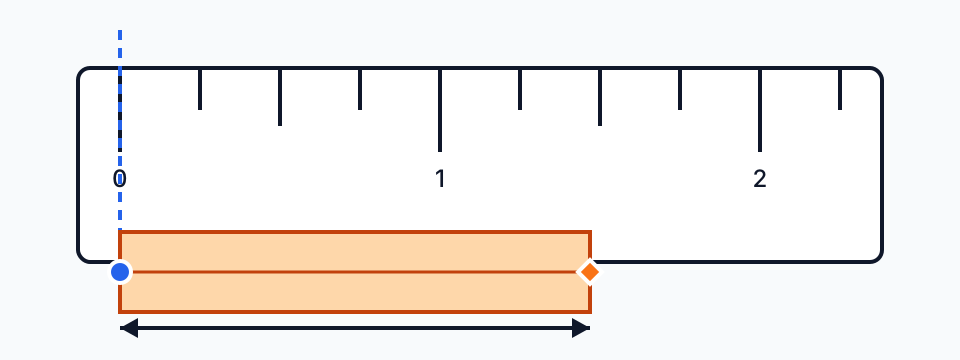
Press and drag across the ruler to measure a distance in cm and inches.
Keyboard: focus the ruler and press Enter to start at zero, then Tab to − or + to adjust.
Measuring small objects in millimeters
Why calibration matters more at this scale
Before calibration, this ruler uses an initial estimate: the 96 CSS-pixel reference on fine-pointer desktops and a device-based estimate on touch screens. Neither knows your display's physical size. Match the outline to a bank card, then verify with a physical reference before relying on millimeter measurements; the methodology page shows the arithmetic.
Limits of a screen at millimeter level
Ticks cannot be finer than a CSS pixel, cover glass adds a small parallax offset, and the calibration slider moves in 0.5 CSS px steps. Pixel spacing, displayed decimals and measurement accuracy are different things; verify your setup with a physical reference. For tighter tolerances use calipers.
Millimeters to fractional inches
Imperial hardware is specified in fractions. The table gives the decimal inch value and the nearest 1/16 mark for common millimeter sizes.
| mm | Inches (decimal) | Nearest 1/16 in |
|---|---|---|
| 1 | 0.039 | 1/16 in |
| 2 | 0.079 | 1/16 in |
| 3 | 0.118 | 1/8 in |
| 5 | 0.197 | 3/16 in |
| 6.35 | 0.250 | 1/4 in |
| 10 | 0.394 | 3/8 in |
| 12.7 | 0.500 | 1/2 in |
| 15 | 0.591 | 9/16 in |
| 20 | 0.787 | 13/16 in |
| 25.4 | 1.000 | 1 in |
Related tools
For parts you cannot lay on the screen, photograph them beside a ruler or a bank card and use the image measurement tool. For any value use the unit converter; for imperial hardware switch to the inch ruler.
Millimeter reference tables
Small parts are where millimeters matter most. These tables list the standardized sizes most often checked on a screen ruler.
Metric screw and bolt sizes
A metric thread is named after its nominal outer diameter: an M4 screw measures 4 mm across the threads. Measure the length from under the head to the tip, or the full length for a countersunk screw. The tool sizes help you pick the right hex key or wrench once you know the thread.
| Thread | Outer diameter | Coarse pitch | Hex key (socket head) | Wrench (hex head) |
|---|---|---|---|---|
| M2 | 2 mm | 0.40 mm | 1.5 mm | 4 mm |
| M2.5 | 2.5 mm | 0.45 mm | 2 mm | 5 mm |
| M3 | 3 mm | 0.50 mm | 2.5 mm | 5.5 mm |
| M4 | 4 mm | 0.70 mm | 3 mm | 7 mm |
| M5 | 5 mm | 0.80 mm | 4 mm | 8 mm |
| M6 | 6 mm | 1.00 mm | 5 mm | 10 mm |
| M8 | 8 mm | 1.25 mm | 6 mm | 13 mm |
| M10 | 10 mm | 1.50 mm | 8 mm | 16 mm |
| M12 | 12 mm | 1.75 mm | 10 mm | 18 mm |
Pitch is ISO 261 coarse thread, hex key sizes follow ISO 4762 and wrench sizes ISO 4014/4017; some older DIN bolts use 17 mm for M10 and 19 mm for M12. A screen ruler can confirm the size class — use calipers or a thread gauge to tell close sizes or pitches apart.
Small objects with standard millimeter sizes
Cards, connectors and batteries are made to tight specifications, so they double as quick checks of your calibration at the millimeter level.
| Object | Size (mm) |
|---|---|
| Nano-SIM card (4FF) | 12.3 × 8.8 × 0.67 mm |
| Micro-SIM card (3FF) | 15 × 12 × 0.76 mm |
| microSD card | 15 × 11 × 1.0 mm |
| SD card | 32 × 24 × 2.1 mm |
| USB-C plug | 8.25 × 2.4 mm |
| USB-A plug | 12 × 4.5 mm |
| CR2032 coin cell | Ø 20 × 3.2 mm |
| AAA battery | Ø 10.5 × 44.5 mm |
| AA battery | Ø 14.5 × 50.5 mm |
| Bank card thickness | 0.76 mm |
Measuring tiny parts
- Measure thin items by stacking: ten sheets of paper or ten washers read ten times larger, so a 1 mm reading error becomes 0.1 mm per item.
- For round parts, measure across the widest point and rotate the part to repeat; the largest reading is the diameter.
- Watch straps are sized by the lug width, the gap between the lugs on the case — commonly 18, 20 or 22 mm.
- For a bead or gemstone, use the drag readout from edge to edge and repeat on the other axis.
- If two sizes are within 0.5 mm of each other (M2.5 and M3, for example), confirm with calipers. A screen ruler has CSS-pixel steps and cover-glass parallax that the accuracy page explains.
How to use this ruler
- Calibrate with a bank card before measuring small parts; a 3% error is a whole millimeter on a 30 mm object.
- Keep the mm tab selected: labels count in tens of millimeters and every short mark is 1 mm.
- Lay the object flat against the screen at the 0 mark and look straight down at its far edge to avoid parallax.
- Drag along the ruler to see a one-decimal-mm readout; the displayed decimal is not an accuracy guarantee.